Risk controls · 2026-08-12
WhatsApp Sensitive-Word Monitoring: How Teams Catch Risk Earlier
How configurable rules, AI semantic detection, real-time alerts, and accountable audit trails help teams protect company WhatsApp Business conversations.
Published 2026-08-12 · WADesk Content Team
WhatsApp is where many sales promises, support decisions, and customer relationships are made. That makes it valuable for the business—and difficult to govern once a team grows beyond a few people. A manager cannot read every work chat, yet a missed message about a private deal, an unauthorized discount, or a serious complaint can become a customer, revenue, or legal problem. Sensitive-word monitoring gives teams a practical early-warning layer for the company-owned WhatsApp Business accounts they operate.
This is not a case for covert surveillance. WADesk is designed for WhatsApp Business accounts owned or administered by the company, with the team informed about the monitoring policy. The purpose is proportionate business governance: protect customer relationships, help managers intervene when needed, and leave an accountable record of how work conversations were handled.
Why manual chat review stops working
At a small scale, an owner may spot-check conversations or ask a supervisor to review a few chats. As sales and support volume grows, that approach fails in two directions. Important risks are buried in hundreds of ordinary messages, while broad manual review consumes management time and creates inconsistent decisions. The manager usually sees an issue only after a customer leaves, a promise is disputed, or a colleague reports it.
The risks are concrete. A representative may try to move a buyer to a personal number or payment channel, taking a company lead off-platform. Someone may promise a discount, delivery date, refund, or feature that is outside policy. A customer may use complaint or legal-risk language that deserves escalation but receives only a routine reply. During a departure or handover, the final conversations on an account can reveal unresolved commitments that the next owner needs to understand. A reliable signal is more useful than a manager trying to guess where to look.
How WADesk sensitive-word monitoring works
Start with configurable rules. The person responsible for sales operations, customer support, compliance, or the account can build keyword lists around real business risks: competitor names, phrases such as “pay me directly,” unapproved discount language, prohibited commitments, or terms used in recurring complaints. Rules should describe a legitimate reason to review a conversation, not an assumption that an employee has done something wrong.
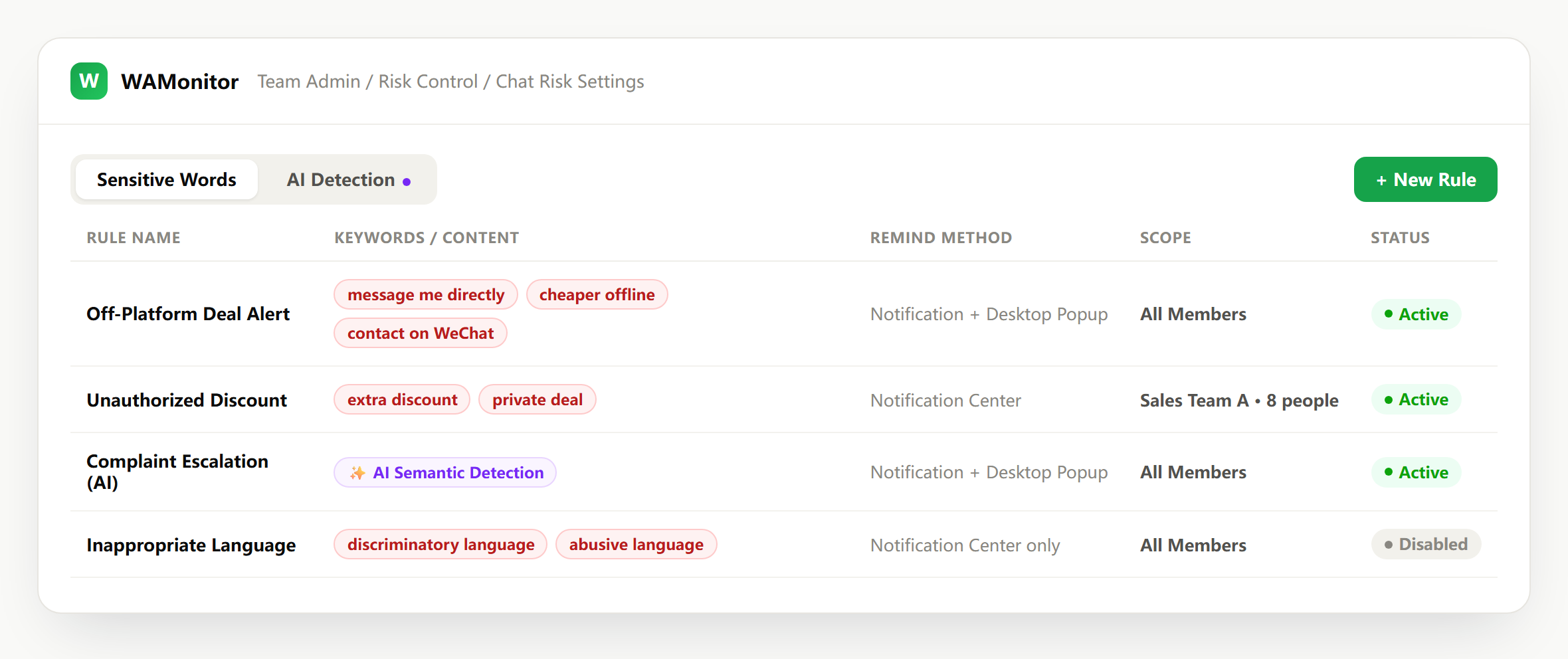
Exact keywords are important, but they are not enough. People rarely use identical wording. AI semantic detection helps identify a similar intent when a message is paraphrased—for example, a suggestion to “settle this outside the system” rather than the exact phrase “pay me directly.” Managers can pair high-confidence keyword rules with semantic detection, then tune them from actual alert outcomes. That combination catches meaningful risk without requiring an ever-longer list of phrases.
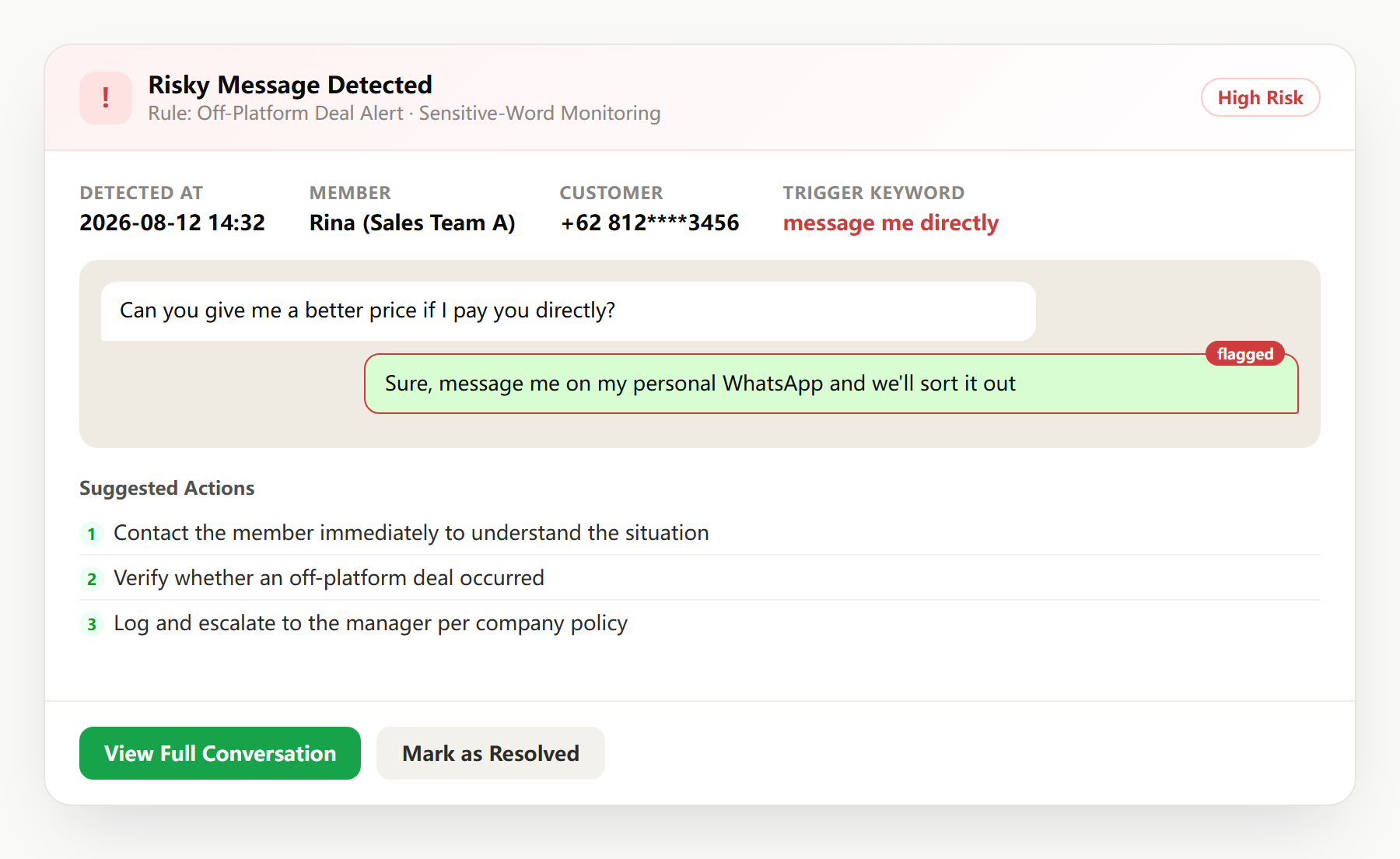
When a rule or semantic signal is triggered, the designated manager receives a real-time alert. The alert should lead to the relevant company work-chat context, rather than a bare keyword alone, so the reviewer can understand who said what, what came before it, and whether action is warranted. Depending on the policy, the next step may be coaching, a correction for the customer, an approved escalation, or simply marking the alert as benign.
The compliance audit log makes that review accountable. It records the signal, the time, the rule that triggered it, and the available work-chat history. That record supports handovers, customer investigations, and compliance reviews without forcing managers to reconstruct an incident from memory. Apply role-based access and a defined retention schedule so only authorized people can review information and records are kept only as long as business and legal requirements justify.
False positives are part of a good process
A sensitive-word match is a prompt to review, not a verdict. A customer might mention a competitor to ask for a comparison; a rep might quote a prohibited phrase to explain why it cannot be offered. Treating every alert as misconduct damages trust and makes teams ignore the system. Instead, give managers a clear disposition: no issue, coaching opportunity, customer recovery, or escalation. Review false positives regularly and refine the rule, its context, or who receives it.
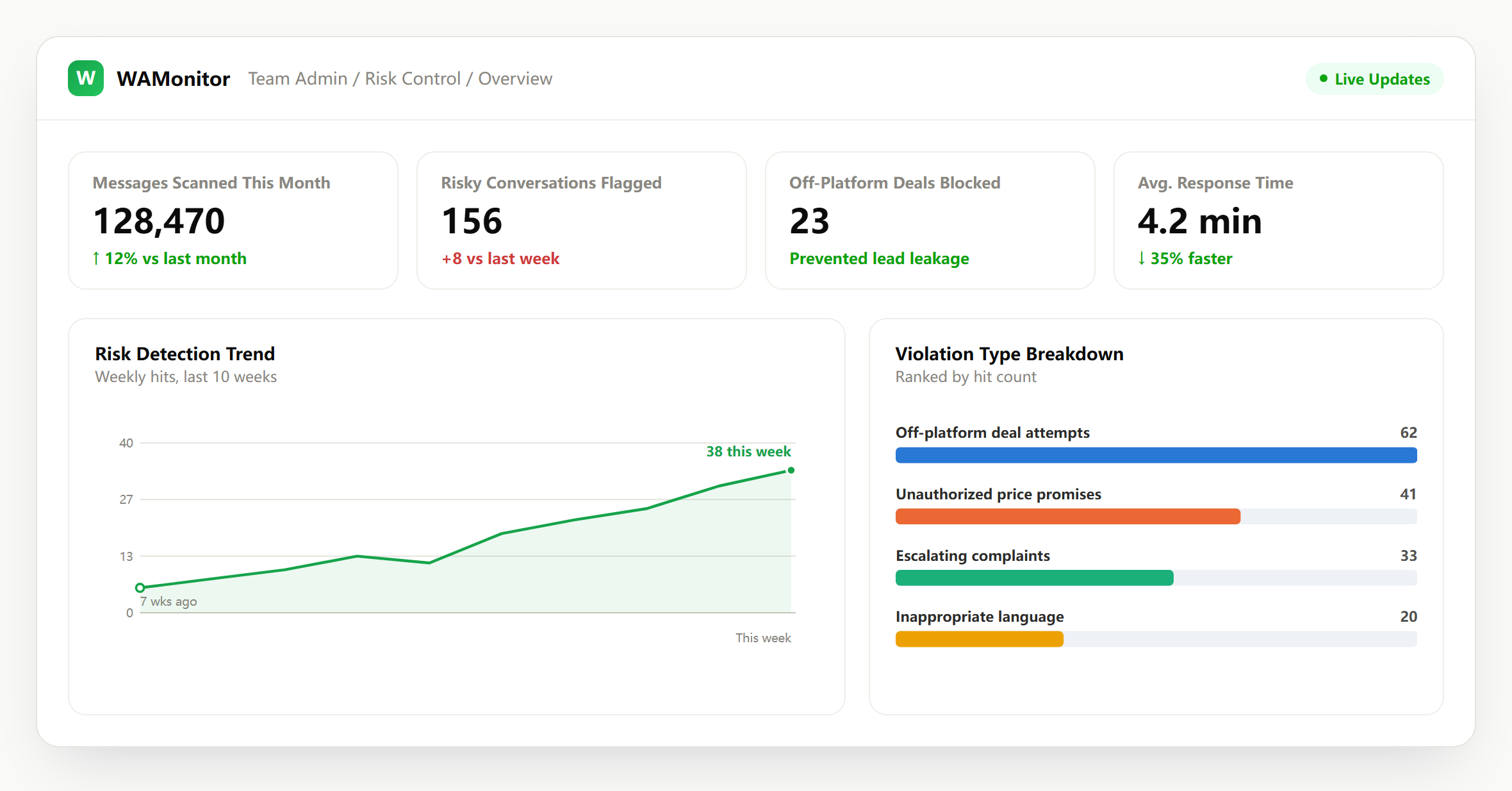
Four situations teams can catch earlier
1. A representative moves a deal off-platform
A prospect is told to contact a personal number for a “faster arrangement” or to pay outside the company process. A rule for private-payment language or a semantic signal for off-platform dealing alerts the manager while the conversation is still active. With context, the manager can protect the customer, clarify the approved process, and decide whether coaching or a formal escalation is appropriate.
2. A pricing promise falls outside policy
A rep tries to save a deal by offering a discount or price guarantee they are not authorized to make. A sensitive-word rule catches the specific discount language, while semantic detection can flag a differently worded promise. The manager can confirm the actual policy, respond before the commitment hardens, and use the case to improve sales enablement.
3. A complaint escalates unnoticed
A customer writes that they will report the company, seek legal advice, or share a poor experience publicly. The support queue may be busy and the message may otherwise look like one more conversation. An alert routes it to a manager quickly enough to coordinate a thoughtful response, preserve the customer context, and identify whether a product or process issue is repeating.
4. A departing employee’s final conversations
Before a team member leaves, their company account may contain open quotes, unusual requests, or relationships that need a clean handover. Monitoring the company-owned account according to the disclosed policy gives the incoming owner a reviewable work record. It helps protect continuity without accessing anyone’s personal device or private account.
Frequently asked questions
Does it support multiple languages?
Rules can reflect the languages your team and customers use. Combine language-specific keyword lists with semantic detection, then test and tune against real, permitted work conversations to make sure the alerts are useful.
Does this mean reading employees’ personal chats?
No. The appropriate scope is company-owned or company-administered WhatsApp Business accounts, with team members informed that monitoring is in place. Do not use it to access personal devices or someone else’s private account.
Who configures the rules?
Usually an authorized manager from sales, support, operations, or compliance configures them with input from the people responsible for policy. Begin with a small, high-confidence set of risks, define alert owners and responses, and review the rules on a regular schedule.
What happens after a false positive?
The reviewer checks the chat context and marks the result appropriately. Use repeated false positives to adjust the term, semantic context, or escalation path; do not treat a match as proof of wrongdoing.
How are retention and access controlled?
Set role-based access, document who may review alerts and archives, and define retention in line with company policy and applicable local requirements. The audit trail should support legitimate management needs while remaining proportionate.
Build rules around your real risks
Effective monitoring is not about creating the largest possible keyword list. It is about defining the handful of events that deserve a faster, more informed review, then giving accountable managers the context to respond fairly. WADesk Max includes sensitive-word and risk controls for teams that need that structure. Contact Sales to scope the right rules, alert owners, and rollout approach for your company WhatsApp Business accounts.